The 5-minute conference room reset between meetings
A simple checklist for office staff to reset a conference room in five minutes, so the next meeting starts in a clean, ready room.
A conference room is the one space where clients, partners and candidates see your office up close. It also gets used all day by different groups. A five-minute reset between meetings keeps it presentable and saves the awkward scramble when the next group is already at the door. Here is a routine anyone on your staff can follow.
Before you start
Keep a small kit in the room or in a nearby cupboard so the reset does not require a search:
- Microfiber cloths
- A spray bottle of all-purpose cleaner or disinfectant wipes, used as the label directs
- Whiteboard cleaner and an eraser
- A small trash bag
- A glass-safe cleaner or damp cloth
Open the door as you start. It helps the air and signals the room is being prepared.
The checklist
Work around the room in one direction, high to low, so you do not have to repeat anything.
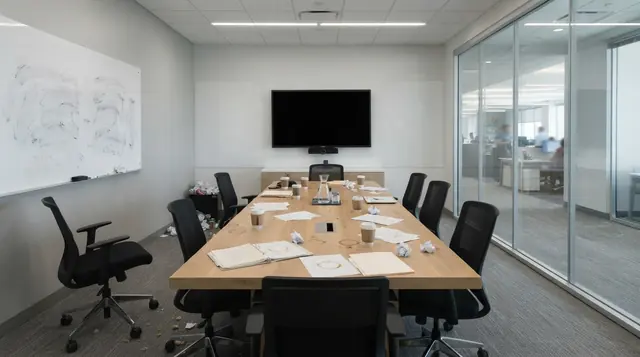
- Trash first. Take cups, napkins, food wrappers and loose paper. Remove the bag if it is full and replace it. Check under the table and chairs for things people dropped.
- Table. Clear everything off it. Wipe the surface with a cloth, spraying the cloth rather than the table where you can. Pay attention to the places elbows and hands touch, and sticky rings from drinks.
- Chairs. Push them in neatly. Wipe the armrests and the backs, where hands land. Check the seats for crumbs.
- Whiteboard. Erase fully, including the corners and the tray. Ghost marks that stay on a board look sloppy. If marker has dried, use the board cleaner, not water alone. Put pens and the eraser back where they belong, and replace markers that are dry.
- Remote and screen. Wipe the remote, any touch panel and the conference phone. Follow the maker's guidance for screens, and see our post on cleaning office electronics. Make sure the remote has working batteries and sits in its usual place.
- Cords and cables. Straighten loose cords, coil spare cables and make sure the right adapters are on the table. A tidy set of cables says the room is ready.
- Air. Open a window or door for a minute if you can. If the room smells of lunch, take the food waste out with you.
- Blinds. Set them to a comfortable position and straighten any that hang crooked. Closed blinds in an empty room can make the space feel stuffy.
- Last look. Stand in the doorway for ten seconds. Check the floor, the table, the screen and the chairs. Switch off lights and displays if the room will sit empty.
Make it a habit
A reset works best when it is a shared habit rather than one person's job. Some ideas:
- Put a printed copy of the checklist inside the room.
- Ask whoever hosted the meeting to run the reset before leaving.
- Block five minutes in the room booking system after each meeting, if your calendar tool allows it.
- Keep the kit visible and stocked, so there is no excuse.
Where a professional team makes the difference
A reset is a tidy-up and a quick wipe. It makes the room usable, but it does not replace a real cleaning visit. Over time, dust builds up on vents, shelves and the tops of screens, carpets collect grit, glass picks up fingerprints, and the underside of the table keeps what the top lost.
That is the work a professional team takes on: the deeper version of every step above, including floors, high-touch surfaces cleaned and disinfected as the label directs, dust from the places a five-minute reset skips, and the trash. A team working from a written checklist does it the same way each visit, and you can see what is in every visit on our checklist section. When we come after hours, or whenever suits you, the room is fresh when your team walks in, and nobody has to take on a big job on top of their meetings.
When the room needs more
Call for a deeper clean when:
- Chairs show visible stains or smell musty.
- The table has built-up residue that wiping does not remove.
- Carpet has marks that do not come out with vacuuming.
- The room is used for client events or training days with a large group.
The short version
- Take five minutes: trash, table, chairs, whiteboard, remote and screen, cords, air, blinds.
- Keep a stocked cleaning kit in or near the room.
- Make the reset a shared habit with a posted checklist.
- The reset keeps the room ready. The professional visit does the deep version.